
Keep It Sparkling: Electronic Device Cleaning Service – Full Guide for Home and Office
In today’s world, electronic devices power our lives—at home and in the workplace. Dust, fingerprints, bacteria, and unseen grime can quickly diminish performance, shorten the lifespan of your tech, and even compromise health when shared equipment is involved. Whether you’re a homeowner, property manager, or business leader, understanding how to keep technology spotless is essential. In this comprehensive guide, you’ll discover the professional approach to Keep It Sparkling: Electronic Device Cleaning Service, with expert protocols, tailored checklists, safety standards, and what to expect before choosing a cleaning provider. Powered by the trusted experience of CHICAGOLAND Cleaning Services, this resource delivers a step-by-step journey to true electronic device hygiene in any setting.
The Hidden Costs of Neglected Electronic Devices
Ignoring the cleanliness of electronic equipment leads to far more than unsightly smudges. Excess dust and residue can clog vents or connectors, causing overheating, data loss, or even fire risk. Grimy touchscreens and shared keyboards also harbor pathogens, contributing to workplace or household illnesses. Let’s break down the primary issues created by device neglect:
- Reduced lifespan: Dust and debris build-up shortens the functional life of electronics.
- Performance drops: Overheating from blocked vents results in slowdowns and unexpected shutdowns.
- Infection spread: Shared devices (tablets, phones, computers) become reservoirs for bacteria and viruses.
- Poor presentation: Unclean devices undermine professionalism and client trust.
What Counts as an Electronic Device for Professional Cleaning?
Electronic cleaning services cover a large roster beyond just computers. Here’s a breakdown of typical items addressed during residential and commercial jobs:
| Device Category | Residential | Commercial |
|---|---|---|
| Computers & Laptops | ✔ | ✔ |
| Monitors & Screens | ✔ | ✔ |
| Printers & Copiers | ✔ | ✔ |
| Keyboards & Mice | ✔ | ✔ |
| Mobile Devices (phones, tablets) | ✔ | ✔ |
| Remote Controls | ✔ | ✔ |
| Audio/Video Equipment | ✔ | ✔ |
| Smart Home Systems | ✔ | |
| POS Terminals | ✔ | |
| Conference Room Tech | ✔ |
Device Hygiene: What Makes Electronics Cleaning Unique?
Every cleaning task is different, but electronics demand extra skill. Liquids must be used with caution, static discharge avoided, and specialized tools deployed to ensure no damage occurs. Unlike general surface cleaning, the focus here is safe removal of dust, residues, and bio-contaminants from vented housings, touchscreens, and sensitive circuit areas. This means:
- Antistatic microfiber cloths and brush sets
- Alcohol-based, device-rated cleaning solutions
- Air blowers for vent clearing
- Touchscreen-safe disinfectants
- No abrasives or forbidden chemicals
Why Regular Cleaning Schedules Matter for Electronics
Unlike floors or restrooms, electronic device hygiene is rarely “visual,” making scheduled maintenance essential. Dirt and bacteria accumulate in places you can’t easily see—between keys, inside fans, under buttons. For both home and professional environments, a tailored timeline keeps equipment reliable. Factors influencing frequency include:
- Level of use (shared devices require more frequent cleaning)
- Environment (dusty, humid, or food-friendly spaces need attention more often)
- Health considerations (medical, childcare, or hospitality settings require stricter protocols)
Establishing clear cleaning intervals, tracked and verified, prevents avoidable downtime and ensures sanitary operation. For insight on scheduling deep cleans in clinical or childcare settings, see this resource on infection reduction.
Pre-Clean Inspection: Safety and Damage Checks
Before any cleaning begins, professionals conduct an inspection to identify:
- Signs of physical damage (cracks, exposed wires)
- Active warranty conditions (so cleaning does not void coverage)
- Manufacturer restrictions or needs (non-standard coatings or smart tech features)
This step ensures the safest process for your devices. For business clients, documentation and photographic evidence can be included as part of service transparency.
CHICAGOLAND Cleaning Services’ Professional Device Cleaning Process
The process undertaken by qualified professionals differs substantially from DIY approaches. At CHICAGOLAND Cleaning Services, trained staff follow these core steps for both residential and commercial device care:
- Disconnect and secure: All devices are powered down and unplugged.
- Surface assessment: Identify sensitive areas, warning labels, and ports that require special attention.
- Dust removal: Non-static microfibre and compressed air used for vents, fans, and keyboards.
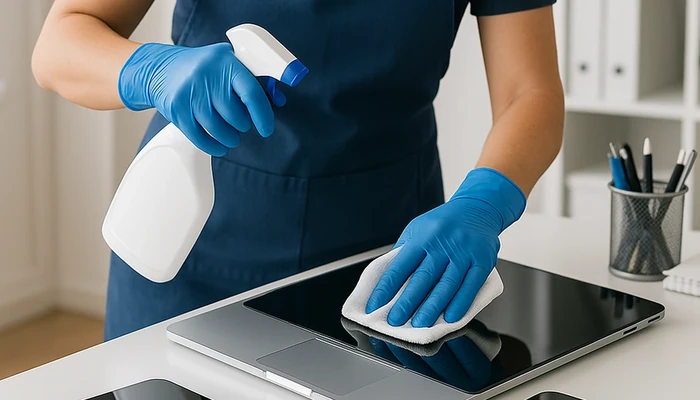
- Solution application: Pre-moistened wipes or cloths (never direct sprays) gently applied on screens, cases, buttons.
- Detailed work: Keyboards, mice, and touchscreens cleaned in detail—removing skin oils and invisible residues.
- Disinfection: Device-appropriate disinfectants applied where needed, especially on high-touch surfaces.
- Final inspection: All devices checked for streaks, residue, or missed spots before reconnecting.
- Sanitation log: For commercial jobs, a completed record acts as proof of service and compliance.
Office vs. Residential Device Cleaning: Key Differences
While the foundational concepts of safe electronic cleaning apply in all settings, the methods diverge based on scale, usage, and compliance needs. Here’s a structured comparison:
- Offices: Emphasis on shared equipment (conference systems, printers). Regular logs, formal scheduling, and hygiene compliance standards.
- Residential: Focus on personal devices, home entertainment, smart systems. Flexible schedules, emphasis on privacy and care for household electronics.
- Regulation: Offices may be subject to stricter standards, such as AORN device cleaning guidelines in medical or high-sensitivity environments.
Checklist: Ready Your Home or Office for Professional Electronic Cleaning
- Back up important data or files (when cleaning computers and storage devices)
- Notify staff or family about scheduled cleaning times
- Relocate or cover food and drink from work areas
- Label devices with active security locks or login screens
- Leave devices powered off for access (unless otherwise instructed)
Safety Protocols and Cleaning Product Standards
Protecting sensitive circuits and finishes is non-negotiable. Trusted providers like CHICAGOLAND Cleaning Services use chemicals and tools tested for:
- Non-conductivity and safe evaporative properties
- No abrasive or corrosive compounds
- Residue-free formulas suitable for screens and plastics
- Compliance with health and safety regulations—see related infection prevention guidelines
Proper application means no overspraying, avoiding liquid accumulation near seams or ports, and post-cleaning wipes to eliminate any remaining moisture.
Understanding High-Risk Areas: Shared Devices and Hygiene Hotspots
Some devices are more prone to bacteria accumulation and require extra effort. Professional technicians focus on:
- Shared keyboards, mice, and remotes
- Touchscreens in public meeting areas
- Multifunction copiers—frequent hand contact zones
- POS terminals and self-service kiosks
For childcare or medical settings, review these guidelines for high-traffic device care.
What to Ask Before Booking a Specialized Device Cleaning Provider
- Do you use device-approved cleaning agents and antistatic materials?
- Is your staff trained specifically for electronics care?
- Can services be customized for my equipment type and risk factors?
- How is safety ensured for sensitive or warranty-protected items?
- Will a cleaning log, report, or compliance checklist be supplied?
Asking these targeted questions ensures your chosen provider, such as CHICAGOLAND Cleaning Services, follows industry excellence standards.
Electronic Cleaning Log: What Documentation Supports Quality?
Especially valuable for offices or managed properties, a well-kept log covers:
- Date and time of service
- Devices cleaned and method used
- Observations of damage or special considerations
- Product batch numbers (for compliance-critical settings)
- Signature of cleaning staff and responsible party
This transparency helps track issues, meet regulatory needs, and validate preventive maintenance.
Tailoring Services: Specialized Electronics Cleaning for Unique Environments
Your cleaning requirements may differ dramatically from other clients:
- Childcare facilities: Devices sanitized for children’s immune profiles
- Medical/dental: Protocols aligned with infection prevention standards
- Retail and hospitality: Frequent turnover, touchscreens, payment kiosks
- Remote work: Flexible schedules for home offices
Explore further steps for health compliance and safety via this resource on health standards.
Beyond the Surface: How Cleaning Supports Device Longevity and Warranty
Professional cleaning extends more than device hygiene—it can prevent costly failures, align with maintenance contracts, and fulfill warranty stipulations (many require proof of regular service for claims). Attempting to clean without professional care can do more harm than good, especially for newer tech or lease-managed equipment.
- Warranty impact: Work with a provider who understands manufacturer guidelines.
- Asset value: Routine cleaning protects your investment—preserving both appearance and operational reliability.
FAQ: Electronic Device Cleaning Service Insights
- How often should professional device cleaning occur in offices?
High-use offices may need cleaning weekly, while private workspaces can schedule monthly. Shared and high-touch equipment benefit from more frequent service—at least biweekly for compliance-critical businesses. - Are all cleaning solutions safe for screens and touch panels?
No. Only use manufacturer-approved, non-abrasive, alcohol-based solutions. Avoid ammonia or bleach compounds unless specifically allowed for the device. - Will cleaning disrupt business operations?
Proper scheduling minimizes disruption—off-hours, rotating stations, or coordinated department-by-department cleaning keeps business running smoothly. - Can personal or confidential data be at risk during cleaning?
No. Professional cleaning services never access files or operate beyond physically cleaning surfaces. Devices may be requested to remain locked or powered down. - Is it worth cleaning cheaper or older electronics?
Regular cleaning adds value to devices of any cost by preventing failures and extending safe use. Prioritize devices in use, regardless of age. - What certifications or training should a provider have?
Look for staff trained in electronics handling and compliant with industry hygiene protocols. Ask about background checks, insurance, and continuing education. - How do I coordinate cleaning with ongoing IT support or security?
Communicate with your internal IT staff in advance—many cleaning providers will work alongside IT to observe safe access and restart requirements. - Does cleaning guarantee virus or bacteria removal?
No process is 100%, but consistent professional cleaning dramatically reduces risk when combined with good hand hygiene.
Wrapping Up: Keeping Your Tech Investment Sparkling
Maintaining pristine electronic devices is more than aesthetics—it’s a form of business and home asset protection, workflow efficiency, and family or staff health. By choosing a professional approach, you’ll benefit from safety, compliance, and real peace of mind. For facilities managing shared equipment or complex environments, consider scheduling specialized visits. To ensure your space’s total cleanliness, see related Office cleaning service or set up a Retail cleaning appointment with trained staff.
About CHICAGOLAND Cleaning Services
CHICAGOLAND Cleaning Services helps households and businesses in Chicago, Illinois and nearby areas keep their spaces clean and healthy. Specializing in recurring house cleaning, deep cleaning, move out cleaning, office cleaning, and specialized facility cleaning, our company’s trained staff follow strict protocols to deliver high quality, reliable results. We focus on attention to detail, flexible scheduling, and the use of professional-grade products for safe and thorough results across both homes and workplaces. If you’re ready to experience the difference, discover more about CHICAGOLAND Cleaning Services and how our expertise protects your technology investment.
commercial cleaning contractors in the city of chicago, office cleaning in chicago, office restroom cleaning chicago, office cleaning Lake Forest IL, office cleaning Bartlett, office trash removal Monee, desk office disinfection Riverwoods IL, Skokie office cleaning, office cleaning Westmont IL, office trash removal Evanston IL